Parsing a page into structured text or Markdown means making a run of judgment calls:
- Is this block of aligned text a table, or just layout?
- Does a header that spans two rows stay two rows, or get flattened into one?
- Is a table that continues onto the next page one table or two?
- Does a flowchart get described, converted to Mermaid, or skipped?
Different parsers make different calls. So two parsers can capture every word on a page and still hand you outputs that mean different things. An agent works only from what the parser hands it, so if the parser groups a header wrong, the agent’s answer is wrong too. But there’s no shared definition of what a correctly parsed page looks like.
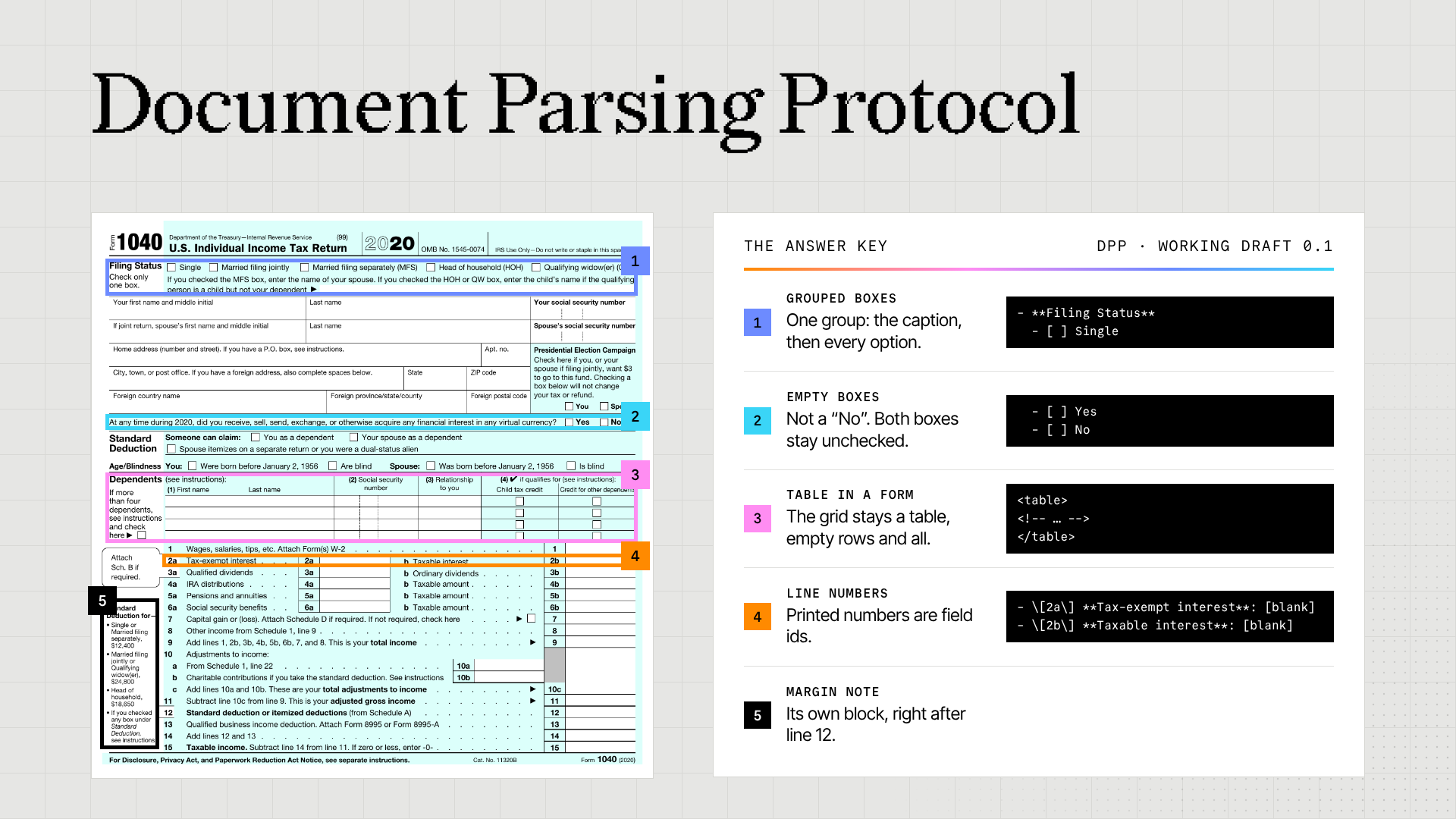
The Document Parsing Protocol (DPP) is our proposed definition: an answer key for document parsing, with the reasoning behind each hard call. Today we're publishing working draft 0.1. Its 140 rules cover text, tables, forms, charts, diagrams, and more, and each comes with example pages and the output it expects. It grew out of the rules our annotators followed when labeling pages for ParseBench, our document parsing benchmark.
The same table comes out three different ways
Here’s a sales page with two header rows. The years run across the top, each spanning its own columns, and the quarters sit underneath. 2023 also has a full-year column.
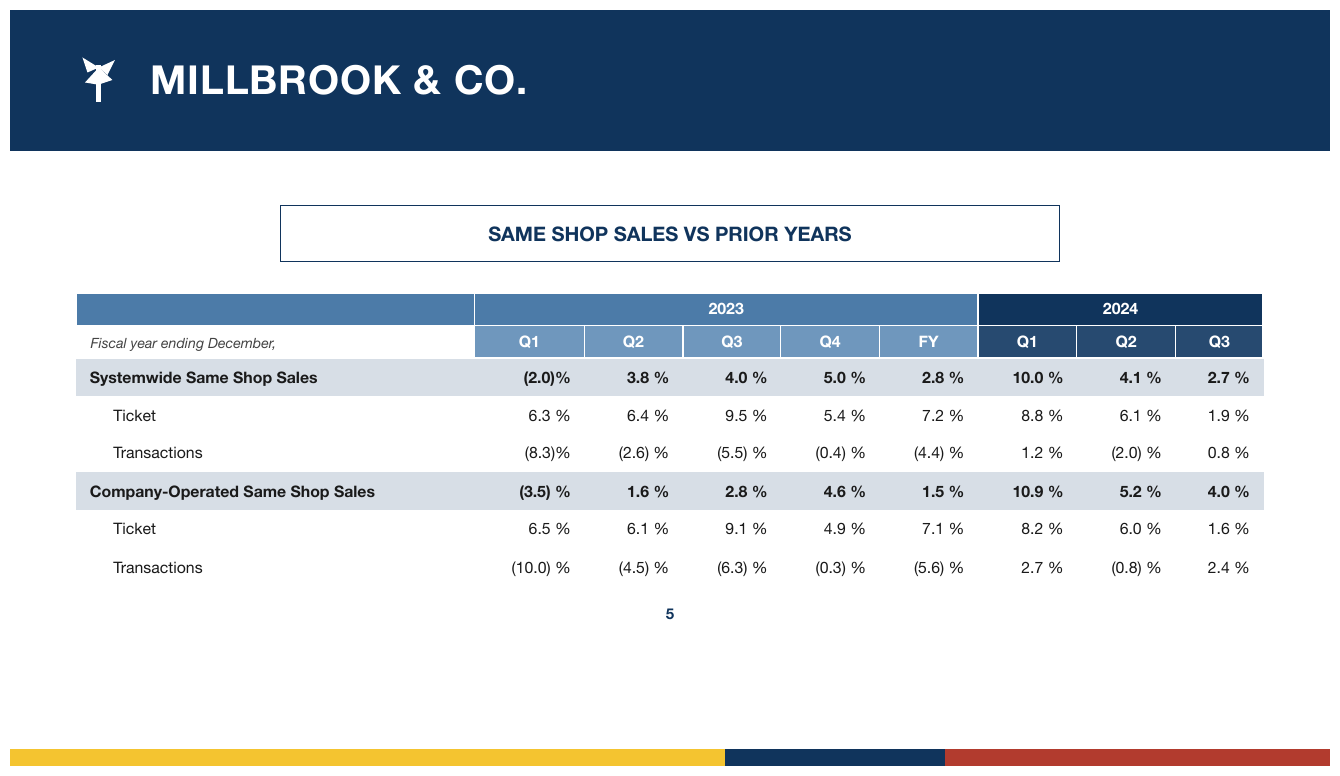
Three parsers might turn that table into Markdown like this, shown down to the first data row.
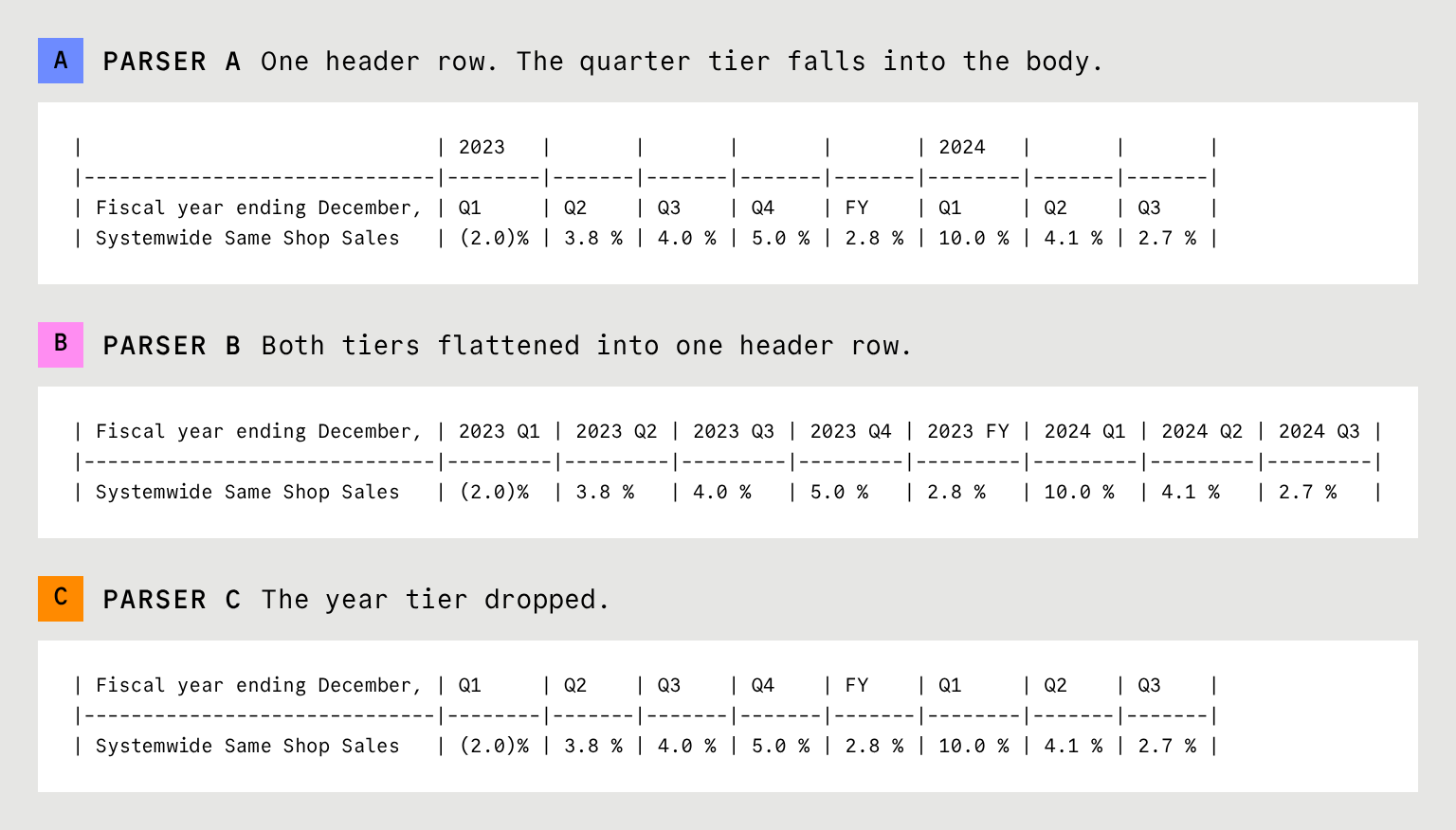
Now ask an agent for Q2 2024 systemwide same-shop sales.
- A pushed the quarters into the body, so the 4.1 % column has no year above it. The agent has to guess that it belongs to 2024.
- C dropped the years, so “Q2” matches two columns: 3.8 % and 4.1 %.
- B gets the right number, but only by inventing a label the page never printed: “2024 Q2”. Another parser might write “Q2 2024”, and code written for B would break on it.
DPP counts all three as wrong. It keeps both header rows exactly as the page prints them. Markdown tables can’t show a header that covers several columns, so DPP uses an HTML table. Here’s DPP’s output for the same table:
html
<table>
  <tr> <th></th> <th colspan="5">2023</th> <th colspan="3">2024</th> </tr>
  <tr>
    <th><em>Fiscal year ending December,</em></th>
    <th>Q1</th> <th>Q2</th> <th>Q3</th> <th>Q4</th> <th>FY</th>
    <th>Q1</th> <th>Q2</th> <th>Q3</th>
  </tr>
  <tr>
    <td data-level="0"><strong>Systemwide Same Shop Sales</strong></td>
    <td><strong>(2.0)%</strong></td> <td><strong>3.8 %</strong></td>
    <td><strong>4.0 %</strong></td> <td><strong>5.0 %</strong></td>
    <td><strong>2.8 %</strong></td> <td><strong>10.0 %</strong></td>
    <td><strong>4.1 %</strong></td> <td><strong>2.7 %</strong></td>
  </tr>
  <tr>
    <td data-level="1">Ticket</td>
    <td>6.3 %</td> <td>6.4 %</td> <td>9.5 %</td> <td>5.4 %</td>
    <td>7.2 %</td> <td>8.8 %</td> <td>6.1 %</td> <td>1.9 %</td>
  </tr>
<!-- … -->
</table>
The 4.1 % now sits under Q2 inside the 2024 header, just as it does on the page.
The decisions go beyond tables
Tables are one part of it. Here’s how DPP handles the rest of a page:
- Forms: an empty field becomes
[blank], so you can tell it was left empty, not missed. Checkboxes stay as[x]and[ ]. - Charts: they become a table of their numbers, with one row per category and one column per series. Printed values are copied exactly.
- Diagrams: they become diagram code, such as Mermaid, when it can hold every label and arrow. If nothing fits, the output describes what’s drawn and keeps every label.
- Hidden and unreadable text: text in the PDF that never shows on the page is left out. Text you can see but can’t read becomes
[illegible]. - Positions: if you ask, each element gets its location on the page, so any value can be checked against the source.
A shared answer key
Anyone who builds a benchmark, labels data, or reviews parser output has to decide what the correct output for a page is. As the sales table shows, that includes decisions about structure, even when every word and number is right. Today each team makes those decisions privately, so two teams can grade the same output differently. We’re publishing DPP so everyone can work from the same written rules, and argue with them in the open.
DPP also spells out which differences are acceptable. Wrapping table rows in <thead> and <tbody> , for example, preserves the same information as leaving those wrappers out. Both forms conform, as long as a document uses one form throughout. A review should accept either.
Try DPP on a page
DPP is live at parseprotocol.com, with each source page shown beside its expected output. The fastest way to see what it does is to run it on a page. Pick Claude or ChatGPT on the site. For Claude, download the skill and upload it under Customize → Skills (skills need code execution). For ChatGPT, add the reference file to a chat. Then attach a page image and paste the prompt from the site.
No page handy? Use the Apple sample page from the site. Check that the 6,485 printed in two cells survives in both, and that (565) keeps its parentheses. Then open the walkthrough of that page, which explains the eight parsing decisions on it.
DPP 0.1 is a working draft, and we want your input. If a rule breaks on one of your documents, or two rules point to different answers, show us. Open an issue or a pull request on GitHub with the page and the output you’d expect, and we’ll work through it with you.